Perplexity Pages: The New AI Content Game-Changer?
Introduction: Bridging the Gap Between Search and Creation
For years, we’ve used AI for two distinct tasks: deep research (finding accurate, cited information) and content generation (drafting blogs, reports, or articles). The issue was always the gap between them. You’d research in one tool, copy the findings, and paste them into another tool (or a document editor) to structure the final piece.
Enter Perplexity Pages, one of the most significant Perplexity AI updates to hit the market.
Perplexity, known for its authoritative, citation-backed conversational AI search, has now taken the next logical step: transforming complex search threads into polished, organized, and instantly shareable AI content. This new feature is more than just a document export; it’s a dedicated AI content creation tool designed to produce high-quality, structured, and visually appealing reports and articles faster than ever before.
This article serves as your ultimate Perplexity Pages guide. We will dive deep into what is Perplexity Pages, detail how to use Perplexity Pages, explore practical Perplexity Pages examples, and analyze whether this feature truly earns the title of a new AI content game-changer that can revolutionize research and content marketing workflows.
Understanding the Core Concept: What is Perplexity Pages?
At its heart, Perplexity Pages is an instant article generator that leverages Perplexity’s powerful real-time search and synthesis capabilities to build a formatted, editable webpage based on a topic or prompt.
Traditional AI writing tools often suffer from three major flaws: a lack of real-time grounding, a high risk of hallucination, and a requirement for extensive human editing to structure the output. Perplexity Pages was designed to tackle all three.
Instead of merely generating raw text, Pages takes the comprehensive, cited research structure that Perplexity is famous for and formats it automatically into a visually appealing, navigable document—complete with sections, headings, images, and, crucially, visible source citations.
The outcome is an authoritative, personalized AI content piece that looks less like a basic text document and more like a high-quality blog post or research report. It’s an ideal tool for anyone needing to distill complex research into an easily digestible and presentable format.
[Related: AI Content Powerup: Speed and Quality Today]
The Genesis: From Answer Engine to Creation Suite
Perplexity’s initial breakthrough was its ability to provide accurate answers by synthesizing information from multiple verified sources and citing them in real-time. Pages simply extends this capability from a personal search view to a public, shareable document.
This move positions Perplexity not just as an AI research assistant, but as a competitor to tools like Notion, Google Docs, and even specialized low-cost web builders, focusing specifically on content derived from factual, current research.
How to Use Perplexity Pages: A Step-by-Step Tutorial
The process for creating a Page is remarkably straightforward, emphasizing easy content creation over complex prompt engineering. Access to Pages is generally part of the Perplexity Pro features subscription, which unlocks its full potential.
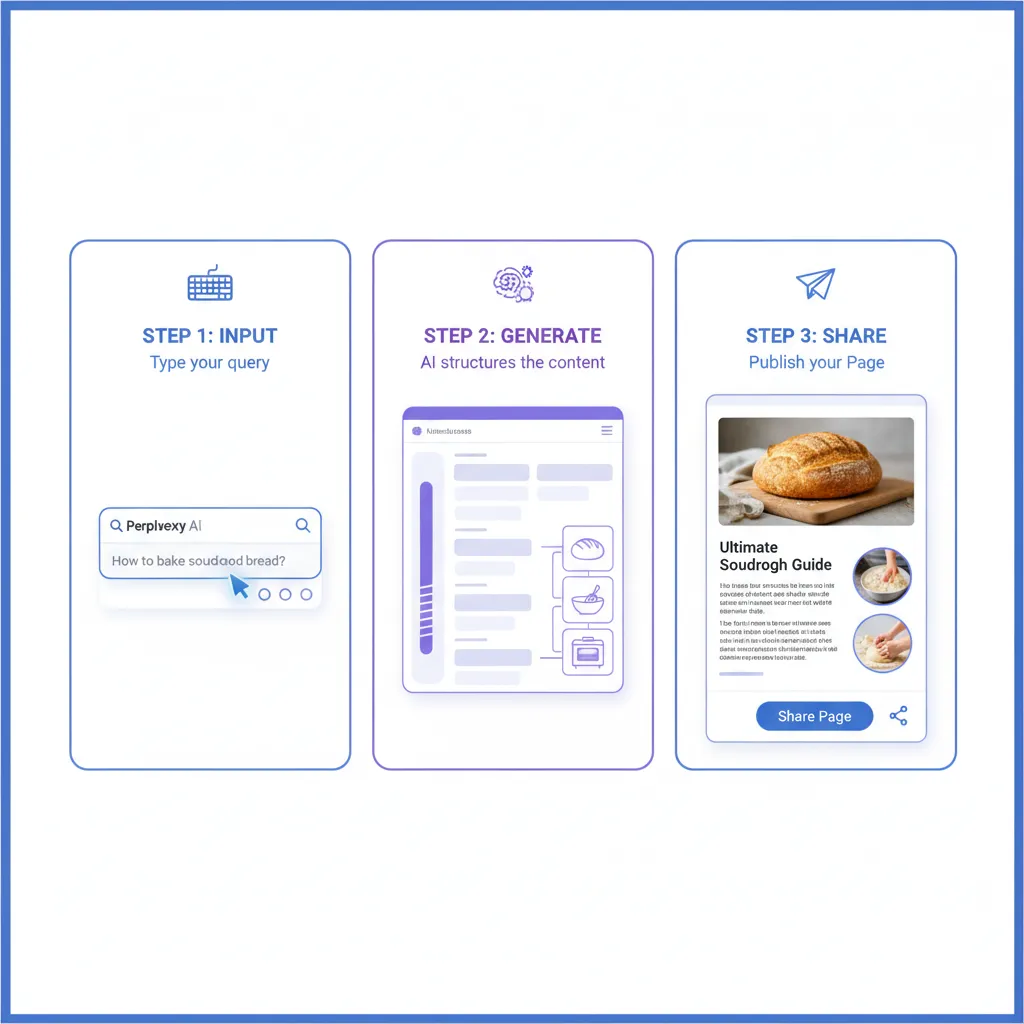
Step 1: Initiating a New Page
You can start a new Page in one of two ways:
- From a Search Thread: If you’ve already conducted a detailed search on a topic (e.g., “The economic impact of 6G adoption”), you can hit the ‘Create Page’ button within the results pane. This leverages all the existing research context.
- From the Dashboard: Select the ‘Pages’ tab and choose ‘New Page.’ Here, you provide a clear, focused title or topic you want the AI to write about.
Step 2: Defining the Scope and Structure
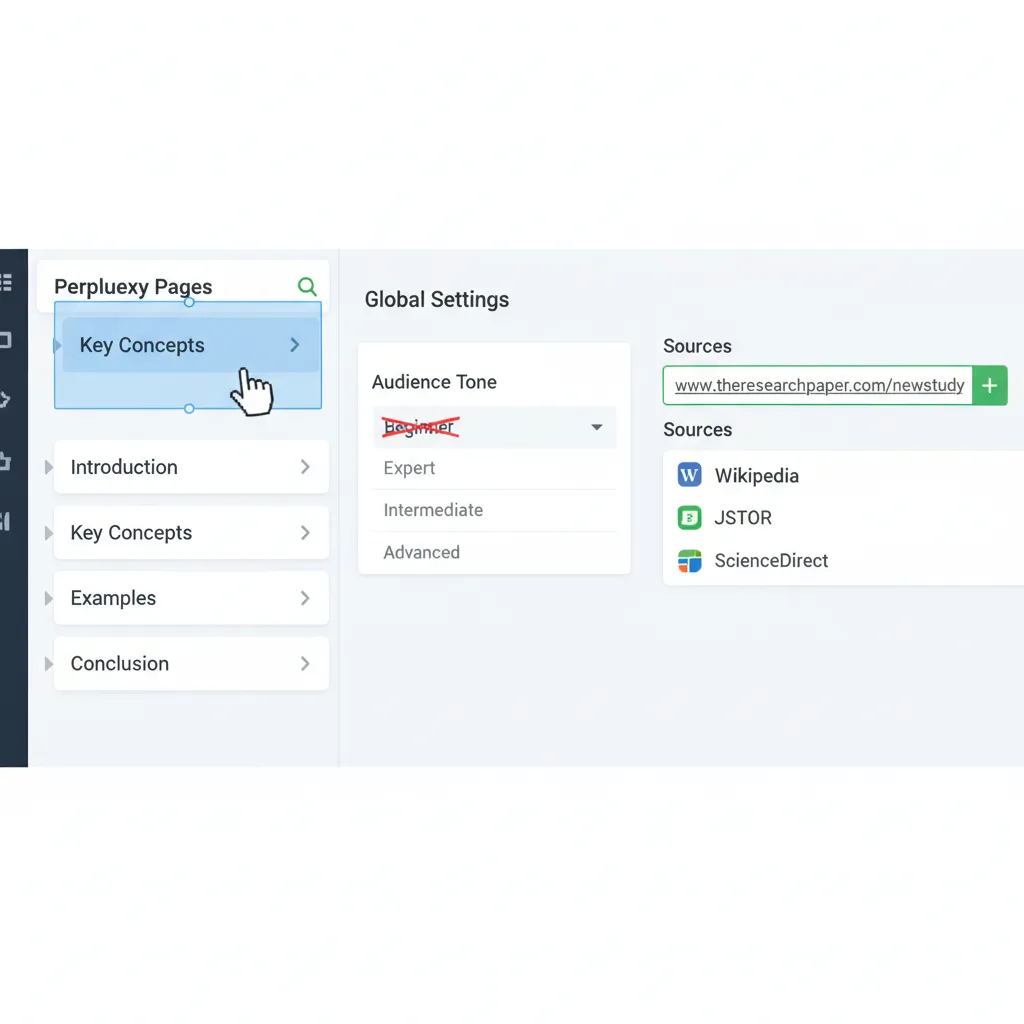
This is the most critical part of the Perplexity Pages tutorial. After entering your core topic, the system asks you to define the audience and structure:
- Audience: Who is this content for (e.g., “Industry Experts,” “Beginners,” “Students”)? This tailors the complexity and tone of the writing.
- Structure: You can choose from predefined layouts (e.g., Tutorial, Report, Article, Presentation) or provide custom subheadings you want the AI to cover. This ensures the output satisfies the exact informational needs of your project. For instance, if you are generating a Perplexity Pages for students report, you might specify sections for “Hypothesis,” “Methodology,” and “Conclusion.”
- Image Style: Perplexity Pages can automatically suggest and integrate relevant images generated by AI (usually through specialized integrations like DALL-E or equivalent models), giving the document a professional, visual flair.
Step 3: Generating and Reviewing the Draft
Once the parameters are set, Perplexity instantly begins generating the Page. This is where the magic of the AI-generated articles happens. The AI performs a focused, deep search and synthesizes the findings into the pre-defined structure.
- The output is a complete article with a title, introduction, structured body, and conclusion.
- All claims are instantly verifiable via clickable source citations embedded directly within the text blocks.
Step 4: Customization and Editing
The resulting Page is fully editable. You can adjust the layout, rewrite sections, add new media, and reorder blocks. This feature is key to transforming an AI-powered report into a truly personalized, human-reviewed final product.
- You can delete unnecessary sections, expand on weak areas, or ask the AI to customize AI reports further by prompting it to elaborate on a specific paragraph.
- This human-in-the-loop editing process ensures the content is accurate and aligns with your brand voice or academic requirements.
Step 5: Publishing and Sharing
When you are ready, the Page can be published instantly via a unique URL, making it highly shareable AI content.
- Pages live on the Perplexity domain (similar to a public Notion page or a Medium article), requiring no external hosting.
- The clean, minimal design ensures focus on readability, which is crucial for modern digital audiences.
Key Features That Make Pages a Real Contender
Perplexity Pages goes beyond mere text generation; it integrates several high-value functionalities that address common pain points in digital content creation.
1. Citation-Driven Authority
The single biggest differentiator is the immediate integration of reliable, hyperlinked citations. In an age of increasing misinformation, the ability to generate an AI-generated article that is automatically grounded in verifiable sources provides immense authority.
This is a massive advantage for AI in content marketing, where trust and E-E-A-T (Experience, Expertise, Authoritativeness, Trustworthiness) are paramount for SEO success. Google rewards content that demonstrates research depth, and Pages delivers this natively.
2. Built-in Visual Design and Presentation
Unlike raw text output from a chatbot, Pages uses a clean, responsive layout. It automatically handles formatting, including:
- Bold and italic text.
- Bullet and numbered lists.
- Image placement (using the AI image generation feature).
- Clear H2, H3, and H4 structures.
For those needing quick presentations or pitch decks, the layout resembles an effective AI presentation maker, simplifying complex information into digestible slides or sections.
[Related: AI Video Generation: The Future of Content]
3. Dynamic Editability
The platform acts as a lightweight CMS (Content Management System). You can modify any block of text. Furthermore, you can leverage Perplexity’s powerful search function within the editing interface to update facts or add new sections based on real-time data.
This level of dynamic control means the Page can evolve, unlike a static document generated by older LLM models. The ability to refine the structure and details is essential for producing truly high-ranking, expert-level content.
4. Focused Search Context
When you initialize a Page, you can also select a “Focus” (e.g., Academic, Writing, Programming, Reddit). This tells the underlying AI model which corner of the internet to prioritize for its research, ensuring the resulting article is nuanced and highly relevant to the intended audience. For instance, selecting the “Academic” focus when generating an article about quantum computing will prioritize scholarly journals and research papers over news sites or social media.
Mastering the Workflow: Advanced Tips and Techniques
To maximize the potential of Perplexity Pages as a professional AI tools for writers, it’s essential to move beyond the basic prompt and utilize the customization tools effectively.
Tip 1: The Power of Specificity in Prompting
While the AI can handle broad topics, the best results come from highly specific prompts combined with detailed structural requests.
- Instead of: “Write about sustainable investing.”
- Try: “Generate a detailed, authoritative report for millennial professionals on sustainable investing strategies, focusing specifically on ESG screening, impact reporting metrics, and the current legal framework in the EU, structured with H3 subheadings for each topic.”
This specificity allows the AI to narrow its grounding search and produce a more focused, expert-level document, saving you significant editing time.
[Related: AI-Powered Investing: Robo-Advisors for Wealth Growth]
Tip 2: Leveraging the Image Generation Feature
Visual content significantly boosts engagement and readability. Use the integrated image generation to add original, contextually relevant visuals rather than relying on generic stock photos.
- Ensure your alt text (which you will manually edit after generation) is descriptive and SEO-friendly, as visual content is often a core element of high-ranking content.
- For complex topics, prompt the AI to create simple diagrams or charts that summarize data found in the underlying sources.
Tip 3: Strategic Internal Linking
While Pages provides the content structure, integrating your owned content is essential for SEO and brand strategy. Once the Page is generated, manually insert strategic internal link placeholders (like the ones below) to guide readers deeper into your content ecosystem.
- This process elevates the Page from a standalone research document to a hub of interconnected knowledge.
[Related: Sustainable Investing: How to Grow Your Wealth and Impact the Future] [Related: AI Content Creation: Master Generative AI for Digital Marketing]
Practical Use Cases: Leveraging Pages Across Industries
The versatility of Perplexity Pages makes it valuable for diverse professional and academic needs. The feature truly facilitates personalized AI content delivery across the board.
1. Content Marketing and SEO
For digital marketers, Pages acts as a rapid research tool and article framework builder.
- Rapid Draft Generation: Quickly generate first drafts for high-volume content, such as explainer articles on emerging tech or industry trends. This accelerates the path from idea to publication.
- Competitor Analysis: Create detailed, cited reports comparing products or market strategies. This fulfills the needs of the Perplexity Pages review search intent directly.
- Authority Building: Publish high-quality, research-backed pieces on niche topics where citation is mandatory, instantly boosting perceived authority and credibility.
2. Academic Research and Education
Perplexity Pages for students and researchers offers a revolutionary way to organize findings.
- Literature Reviews: Generate structured literature review drafts on complex subjects, complete with all necessary citations for verification.
- Study Guides: Create organized, easy-to-read study guides from scattered class notes or required readings.
- Instant Outlines: Quickly build detailed outlines for theses or dissertations, ensuring all key components and required subtopics are covered.
3. Business Intelligence and Reporting
Businesses can use Pages to streamline internal communication and external reporting.
- Market Analysis: Instantly generate AI-powered reports on competitor activity, regulatory changes, or consumer trends based on real-time data.
- Training Materials: Convert complex company policies or technical manuals into visually clear, segmented training pages for new employees.
- Project Summaries: Turn lengthy research meetings or project threads into concise, shareable status updates, allowing stakeholders to catch up quickly.
[Related: AI Classroom Revolution: Personalized Learning and Future Skills]
Perplexity Pages vs. The Competition: A Head-to-Head
To determine if Pages is truly the best AI for writing research-heavy articles, we must compare it with established content and productivity tools.
Perplexity Pages vs. Traditional LLMs (e.g., ChatGPT/Claude)
| Feature | Perplexity Pages | ChatGPT/Claude (Standard) |
|---|---|---|
| Grounding | Real-time, fully cited web search | Knowledge cutoff or plug-in dependent |
| Output Format | Structured, formatted, shareable webpage/report | Raw text output (needs manual formatting) |
| Ease of Sharing | Instant public URL, hosted on Perplexity | Requires copy/pasting into external doc |
| Authority | High (due to automatic citations) | Low to Moderate (citation risk/hallucination) |
| Primary Use | Converting research into presentable content | Idea generation and raw text drafting |
Perplexity Pages excels in the instant article generator category by prioritizing verifiable facts and structured output, reducing the post-generation cleanup required by general-purpose LLMs.
Perplexity Pages vs. Notion/Obsidian
The comparison with workspace tools like Notion and Obsidian is interesting, as Pages also facilitates the create a webpage with AI function.
Pages is superior for speed and research synthesis. A Notion user must manually gather all sources, structure the document, and format it. Pages does the research, synthesis, structure, and basic formatting instantly.
However, Notion vs Perplexity Pages reveals a functional gap: Notion remains superior for long-term project management, database creation, complex team collaboration, and truly deep, custom page design. Pages is the winner for creating high-quality single-topic research reports quickly, while Notion is the winner for building comprehensive, interconnected knowledge bases.
Understanding Access and Availability: Perplexity Pro Features
While Perplexity AI offers a robust free tier, the full power of the Pages feature—especially the deep customization, the ability to generate multiple sections, and the use of the most powerful underlying models (like Claude 3.5 Sonnet or GPT-4o)—is typically reserved for subscribers utilizing Perplexity Pro features.
Why Pro is Essential for Power Users
The Pro subscription doesn’t just unlock access to Pages; it provides the computational horsepower necessary for superior results:
- Advanced Model Access: Pro users can select the most cutting-edge models for generation, leading to more nuanced and syntactically complex prose, essential for human-like, high-authority content.
- Unlimited Copilot Queries: Pages generation relies heavily on the underlying “Copilot” search engine to synthesize information. Pro provides unlimited usage of this feature, allowing for extensive and iterative drafting.
- Faster Processing: When you need an AI-powered report instantly, Pro ensures priority processing, crucial in fast-paced environments like breaking news or competitive marketing.
If your workflow involves regularly generating AI for research or creating external reports, the investment in Pro becomes a clear time-saving advantage.
[Related: Claude 3.5 Sonnet vs GPT-4o: AI King Showdown]
The Future of Content Creation and Perplexity Pages
The arrival of Perplexity Pages marks a clear evolutionary step in content generation. It signals a shift away from the generic, unstructured text outputs of early generative AI toward verifiable, structured, and instantly presentable content forms.
We are moving into an era where the differentiator for AI-generated articles is no longer the ability to write, but the ability to cite, structure, and present that writing professionally and accurately. The platform’s commitment to verifiable truth, symbolized by the integrated citations, aligns perfectly with Google’s increasing focus on E-E-A-T and trustworthy sources.
For anyone involved in digital publishing, academic work, or professional reporting, Pages provides a highly efficient shortcut. It handles the laborious steps of research synthesis and structural layout, allowing the human writer to focus on critical oversight, voice refinement, and adding unique insights—the parts of content creation that machines still can’t fully replicate.
Perplexity Pages is not just a tool; it’s a testament to the fact that the future of the best AI for writing is intrinsically linked to verifiable, real-time research.
[Related: Apple Intelligence Guide for iOS 18: New AI Features]
Conclusion: Is Perplexity Pages the Content Game-Changer?
Yes. While it may not entirely replace specialized tools like Notion for deep organizational tasks or highly customized web design platforms, Perplexity Pages fundamentally changes the game for creating and sharing authoritative, research-backed reports and articles.
By seamlessly integrating conversational AI search with structured document generation, it solves the decades-old problem of converting raw information into a polished final product instantly. For professionals seeking easy content creation that satisfies the twin demands of speed and trustworthiness, Perplexity Pages offers unparalleled efficiency.
We recommend diving in, testing the limits of its customization, and seeing how this powerful AI research assistant can streamline your content workflow today. The blend of source transparency and sophisticated structural generation makes Pages an indispensable feature for the modern, evidence-based content creator.
FAQs: Your Top Questions About Perplexity Pages
Q1. What is Perplexity Pages?
Perplexity Pages is a new feature within the Perplexity AI platform that transforms complex search queries or research threads into structured, visually appealing, and shareable webpages, reports, or articles, complete with automatic source citations.
Q2. Is Perplexity Pages free to use?
While the core Perplexity search engine has a free tier, access to the full functionality and advanced customization options of Perplexity Pages is generally reserved for users with a Perplexity Pro features subscription.
Q3. How does Perplexity Pages compare to using Notion or Google Docs?
Perplexity Pages is an instant article generator that focuses on research and synthesis, creating a structured draft instantly. Notion and Google Docs are primarily manual editors. Pages is faster for creation; Notion/Docs are better for long-term project management and deep collaboration.
Q4. Can I customize the AI-generated articles?
Yes. After the initial generation, the resulting Page is fully editable. You can rewrite sections, reorder blocks, add custom media, and instruct the AI to customize AI reports based on specific editing prompts, ensuring the content is unique and aligned with your goals.
Q5. Are the articles generated by Pages optimized for SEO?
Pages provides excellent foundational material for SEO because the content is structured with clear headings (H2, H3), uses relevant keywords based on the research query, and—most importantly—is grounded in factual, cited sources, which strongly supports Google’s E-E-A-T guidelines for high-quality content.
Q6. Can Perplexity Pages integrate custom images or AI-generated visuals?
Yes, Pages has the capability to integrate AI-generated images based on the content of the article and can be prompted to create relevant visuals, transforming the output into compelling visual AI reports.
Q7. Is Perplexity Pages considered an AI presentation maker?
While not a direct substitute for dedicated slide software (like PowerPoint or Canva), Pages can be used as a sophisticated AI presentation maker by utilizing its structured document layout (often selecting the “Presentation” structure template) to create highly organized, easily digestible sections that serve as excellent talking points or slide content.
Q8. What types of content can I create using Pages?
You can create articles with AI spanning many formats, including research reports, detailed tutorials, book summaries, professional pitch documents, comparison reviews, educational study guides (Perplexity Pages for students), and market analysis.