Apple Intelligence: AI Features & Supported Devices
Introduction: The Dawn of Personalized Intelligence
For years, the technology world waited for Apple’s decisive move into the generative AI landscape. The wait ended with the announcement of Apple Intelligence (often simply referred to as Apple AI), a suite of powerful, intuitive features seamlessly integrated across iOS 18 AI features, iPadOS 18 AI, and macOS Sequoia AI. This isn’t just a set of new apps; it is a profound rethinking of how our devices can anticipate our needs, enhance our communication, and protect our privacy.
Unlike the broad, public-facing models offered by competitors, Apple Intelligence is defined by three core pillars: Power, Personalization, and Privacy. It uses deep contextual understanding—derived from your personal data, schedule, and device activity—to perform tasks that are uniquely relevant to you.
The excitement, however, comes with a caveat. The sheer processing power required for true on-device AI functionality means that not all existing Apple devices are compatible. This article serves as your ultimate guide, answering the crucial questions: what is Apple Intelligence, what groundbreaking features does it bring, and, most importantly, which devices make the cut? We will break down everything from the revolutionary Siri AI update and the playful Genmoji tool to the crucial technical backbone of Private Cloud Compute.
What is Apple Intelligence? A System Designed Around You
Apple Intelligence is the name given to the foundational AI system powering new capabilities across Apple’s operating systems. It is not a single large language model (LLM), but rather a complex integration of specialized on-device and server-based models designed to understand and generate language, images, and actions based on your context.
The system is built on a deep understanding of your personal data—without ever compromising it. This means the AI can answer complex, multi-step queries like, “Pull up that photo my wife sent me from the vacation last August and turn it into a black and white image, then schedule a reminder for next Tuesday to talk about that trip.”
The Three Pillars of Apple’s Approach
- Contextual Awareness AI: This is perhaps the most defining element. Apple Intelligence uses semantic indexing to constantly map and understand your activities, data, and files across all your apps. It knows who you are texting, what meeting you are about to attend, and which emails are high-priority. This deep understanding enables the AI to execute tasks that require personal context, a feat difficult for general-purpose LLMs.
- Productivity and Focus: The new AI features are overwhelmingly focused on reducing cognitive load. From generating summary drafts of long emails to prioritizing urgent notifications, Apple Intelligence aims to make the device work harder so the user can focus more easily.
- Privacy: This is Apple’s defining differentiator. They recognized that true personal intelligence requires access to highly sensitive data. To solve this, they introduced Private Cloud Compute, ensuring that even when tasks need more power than your device provides, the data remains cryptographically secure and ephemeral.
The Game-Changing AI Features of iOS 18, iPadOS 18, and macOS Sequoia
The capabilities introduced by Apple Intelligence are woven into the fabric of the operating systems, appearing in Mail, Notes, Safari, Messages, and the Photos app.
1. A Reimagined Siri: Contextual and Conversational
The Siri AI update marks the most significant overhaul of Apple’s virtual assistant since its inception. Siri is transitioning from a command-based assistant to a natural, contextual awareness AI partner.
New Siri Features Explained:
- Natural Conversation: Siri can now maintain conversational context, allowing for follow-up questions without needing to re-state the subject. If you ask about the weather in London, you can immediately ask, “How about Paris?” and Siri understands the subject remains the weather.
- On-Screen Awareness: Crucially, Siri can now see and interact with what’s on your screen. For example, if you are viewing an article, you can say, “Siri, summarize this page and send the key points to John,” and Siri executes the action instantly.
- Typing to Siri: For the first time, users can type requests to Siri, making the assistant accessible in quiet or sensitive environments.
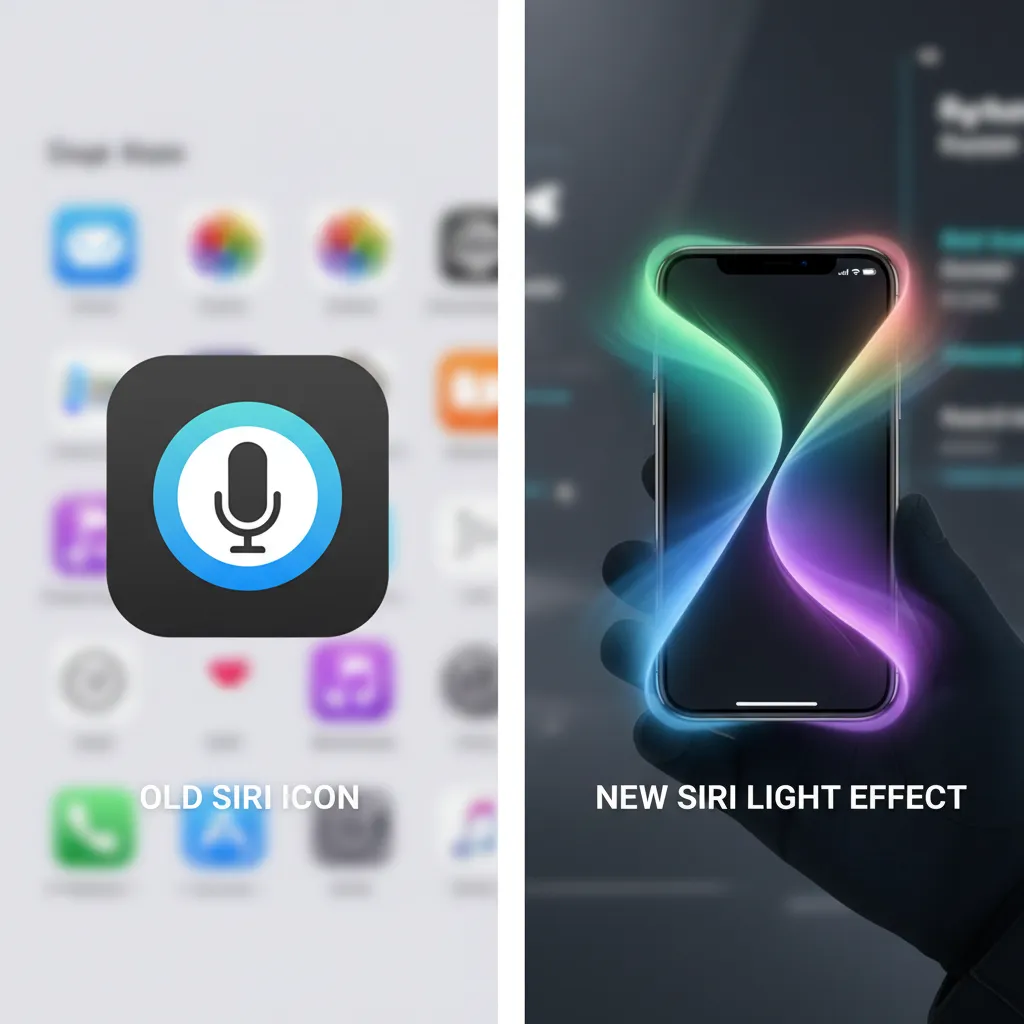
- The New Look: The classic Siri orb is replaced with a subtle, glowing light effect around the edges of the screen, emphasizing its pervasive presence.
| Feature | Description | Benefit |
|---|---|---|
| On-Screen Context | Allows Siri to interact with the content currently displayed. | Seamless multitasking and deeper integration with apps. |
| Typing Support | User can type commands instead of speaking them. | Accessibility and discretion in public settings. |
| System-Wide Action | Siri can perform multi-step tasks across different apps (e.g., finding a photo and scheduling a reminder). | True personal assistant capability based on user intent. |
Image Placement: New Siri AI Glow Interface
[Related: what_is_gpt_4o_openais_new_ai_explained]
2. Apple AI Writing Tools: Write Smarter, Not Harder
Integrated directly into the system, the Apple AI writing tools offer three essential functions wherever you type:
- Rewrite: Adjusts the tone and complexity of your text. You can instantly switch a draft email from a casual tone to a professional one, or vice versa, with a single tap.
- Proofread: Goes beyond simple spell-check, offering suggestions for grammar, word choice, and overall clarity, turning awkward sentences into polished prose.
- Summarize: Condenses long articles, notes, emails, or even audio transcripts into bullet points or a concise paragraph. This is particularly useful for quickly processing information overload.
3. Creative Intelligence: Genmoji and Image Playground
Apple Intelligence introduces playful yet powerful generative media tools that democratize creative expression.
Genmoji: Personalized Emojis
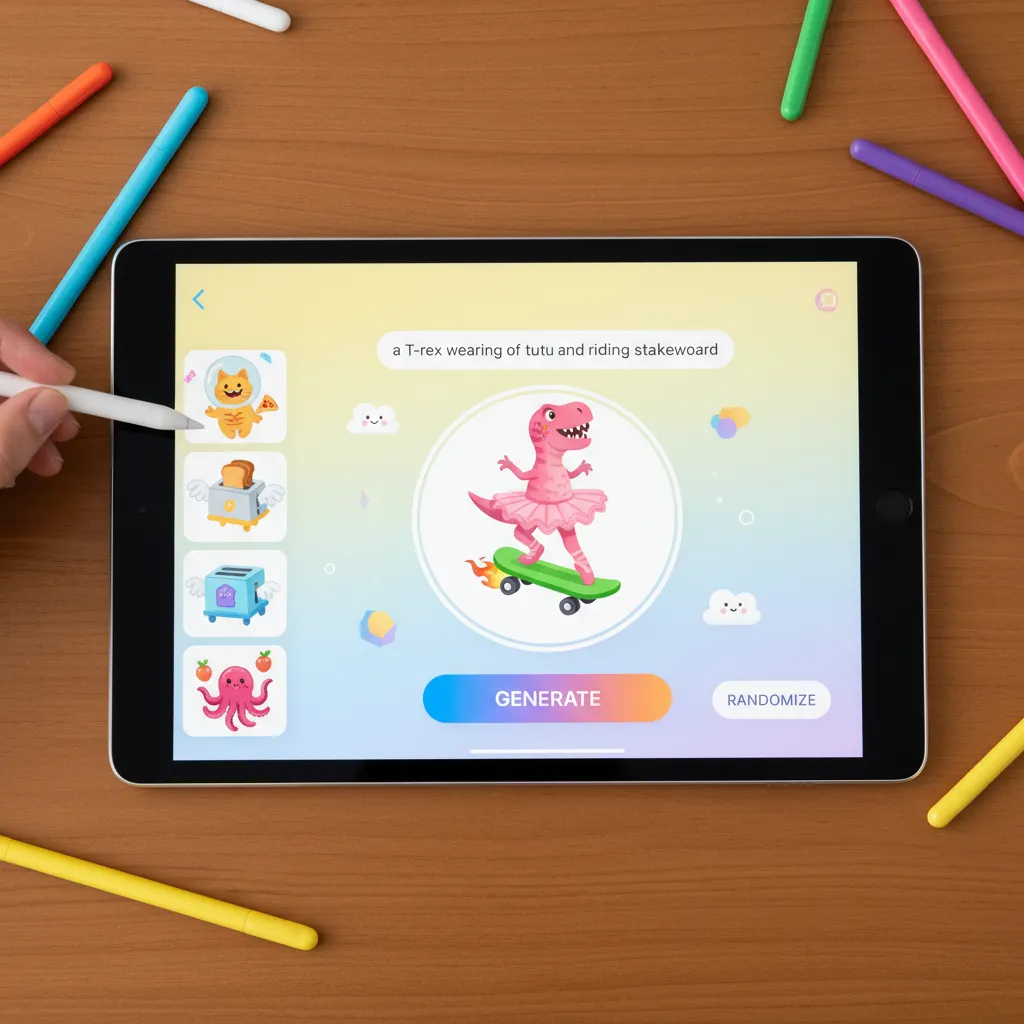
Genmoji allows users to describe an emoji they wish to create, and the AI generates it instantly. Need an emoji of “a T-Rex riding a skateboard while wearing a top hat”? The AI delivers. These unique creations can be used as stickers, reactions, or embedded directly into messages, adding a layer of hyper-personalization that standard emoji sets cannot match.
Apple Image Playground
Apple Image Playground is the company’s tool for quick, fun, on-device image generation. It focuses on three main styles—Animation, Illustration, and Sketch—and is designed for rapid creation within apps like Messages, Notes, and Keynote, avoiding the pitfalls of generating photorealistic, potentially problematic deepfakes. The emphasis is on fun and communication, not professional art creation.
Image Placement: Apple Genmoji Creation Interface
4. Semantic Indexing and Notification Overhaul
The foundational power of semantic indexing is what makes Apple Intelligence so effective at personal task management. It organizes your data not just by file name or date, but by meaning and context.
This is immediately evident in the new notification system:
- Priority Messages AI: The AI analyzes incoming notifications, messages, and emails and surfaces the genuinely urgent ones at the top of your stack, based on your relationships, calendar, and current activity. This filters out the noise, ensuring you see the message from your child’s school or your boss before the 50% off coupon.
- Summarize Notifications AI: If you step away from your phone for an hour, the AI can instantly condense all missed notifications into a single, cohesive summary, saving you the time of swiping through dozens of individual alerts.
5. AI Photo Editing in iOS 18
The Photos app gets a massive boost with powerful, AI-driven tools. The most anticipated feature is the “Clean Up” tool, which allows users to easily identify and remove distracting objects or people from the background of a photograph. This feature leverages the device’s neural engine for rapid, precise object segmentation and inpainting, a capability that previously required professional desktop software.
Image Placement: iOS 18 Photos App AI Clean Up Tool

Privacy First: The Critical Role of Private Cloud Compute (PCC)
For Apple Intelligence to be truly personal, it must know everything about your digital life. For Apple to maintain user trust, it must ensure that data remains private. This dichotomy is solved by Private Cloud Compute (PCC).
On-Device AI Processing: The Requirement
Most of the light-to-moderate complexity tasks (like basic summarization or Genmoji creation) are handled directly on the device. This is known as on-device AI processing.
This local processing is crucial for speed, reliability, and, most importantly, privacy, as the data never leaves your device. However, high-level generative AI tasks, such as handling a massive, complex request across multiple apps, require more computational muscle than even the most modern iPhone can sustain without draining the battery or causing lag.
The Private Cloud Compute Solution
When a task exceeds the on-device capacity, Apple Intelligence securely routes the request to Apple’s dedicated cloud servers using Private Cloud Compute.
Here is how Apple AI privacy is guaranteed through PCC:
- Encrypted Transmission: The request is sent fully encrypted.
- Ephemeral Servers: The cloud servers running PCC operate on proprietary silicon (M-series chips) and are designed to be entirely transparent. Crucially, they use ephemeral logging, meaning no data is stored on the server permanently. Once the task is executed, the data is instantly discarded.
- Cryptographic Attestation: Apple allows security researchers and third parties to cryptographically verify that the servers are only running the code Apple claims—the same code that guarantees privacy. This is a level of transparency unseen in general-purpose cloud computing.
In essence, Private Cloud Compute provides a powerful computational burst for complex AI tasks while ensuring that neither Apple, nor any third party, can access, inspect, or store your personal data.
Image Placement: Apple Private Cloud Compute Security Diagram

The OpenAI Integration: Bridging the Generative Gap
While Apple Intelligence excels at personalized, contextual tasks, general knowledge and complex, open-ended generative tasks often require a massive, world-trained model. This is where the Apple and OpenAI partnership comes into play.
Apple Intelligence vs ChatGPT: A Collaborative Choice
Apple is not replacing its core AI with ChatGPT; it is offering it as an option for requests that fall outside the scope of its personalized models.
- Apple Intelligence Focus: Personalized data, system integration, context, security, and specific in-app tasks (e.g., “Find the email from Dad about the vacation.”).
- ChatGPT Focus: General knowledge, world events, complex creative writing, and broad inquiries (e.g., “Write a haiku about space travel,” or “Explain the theory of relativity in simple terms.”).
When a user asks a question best handled by a powerful general LLM, Siri will ask if the user wants to use ChatGPT (specifically the GPT-4o model). If the user agrees, the request is routed securely to OpenAI’s servers. Importantly:
- It is Optional: Users must consent before the data leaves Apple’s private domain.
- Identity Protection: Apple states that user IP addresses are obfuscated, and OpenAI does not store the requests made through this integration.
This collaboration allows Apple to immediately offer cutting-edge general generative capabilities without compromising the architectural integrity and privacy commitments of its core, personalized system.
[Related: claude_3_5_sonnet_the_new_ai_speed_king]
Device Compatibility Check: Is Your Apple Hardware Ready?
The most frequently asked question since the announcement has been: “is my iPhone compatible with Apple Intelligence?”
The simple answer is that the vast majority of current Apple devices will not support the full suite of Apple Intelligence features. This limitation is not a marketing ploy; it is a technical necessity rooted in the massive computation demands of running large, efficient language models locally.
The Chip Requirement: A17 Pro and M-Series
The key bottleneck is the required neural engine performance necessary for on-device AI processing.
- iPhone Compatibility: You must have an A17 Pro chip AI or later. This means Apple Intelligence is exclusively available only on the iPhone 15 Pro and iPhone 15 Pro Max from the current iPhone lineup, and all subsequent models. Standard iPhone 15 and 15 Plus models (which use the A16 chip) are left out.
- iPad and Mac Compatibility: You must have an M1 chip AI support or newer (M2, M3, M4). This includes a wide range of devices released since late 2020. The integrated Neural Engine on these M-series chips provides the essential hardware acceleration needed for the models.
If your device does not meet these minimum specifications, you will receive the new operating system (iOS 18, etc.) but will not have access to the core features of Apple Intelligence, such as the enhanced Siri, writing tools, and Genmoji.
The Full List of Apple Intelligence Supported Devices
As of the initial rollout (expected late 2024/early 2025), here are the devices that fully support Apple Intelligence:
iPhones
- iPhone 15 Pro
- iPhone 15 Pro Max
- (All future Pro models)
iPads (with M1 or newer)
- iPad Pro (M4, M2, M1)
- iPad Air (M2, M1)
Macs (with M1 or newer)
- MacBook Air (M1, M2, M3)
- MacBook Pro (M1, M2, M3)
- iMac (M1, M3)
- Mac mini (M1, M2, M2 Pro)
- Mac Studio (M1 Max, M1 Ultra, M2 Max, M2 Ultra)
- Mac Pro (M2 Ultra)
This limited compatibility underscores Apple’s commitment to prioritizing performance and privacy. By restricting access to devices with dedicated neural architecture, they ensure a fast, fluid, and secure AI experience, cementing the iPhone 15 Pro AI as the initial entry point into this new era.
Apple Intelligence Release Date and How to Access It
Understanding the features and compatibility is the first step; knowing when and how to get them is the next.
When Can I Get Apple Intelligence?
The Apple Intelligence release date follows the standard software release cycle. While the features were unveiled in June, the core capabilities are integrated into the major annual operating system updates:
- iOS 18
- iPadOS 18
- macOS Sequoia
These operating systems typically launch to the public in the fall (September/October). However, Apple announced that the most advanced Apple Intelligence features will likely arrive in a beta stage initially, with a full rollout scheduled for early 2025 in major markets.
How to Get Apple Intelligence
If you have a supported device (iPhone 15 Pro or an M1/newer Mac/iPad), you do not need to purchase a separate subscription.
- Update Your Device: Ensure your device is running the latest public version of iOS 18, iPadOS 18, or macOS Sequoia when the features are officially released.
- Ensure Language is Set: Initial features are often rolled out with English (U.S.) as the primary supported language, though global expansion is rapid.
- Activate Settings: There may be optional settings related to personalized context or the ChatGPT integration that you must explicitly enable during setup.
The future of Apple AI hinges on the continued optimization of these on-device models, making the seamless integration the new standard for personalized computing.
Conclusion: The Personalized Future of Apple AI
Apple Intelligence is more than just a reaction to the current AI boom; it is a strategically designed, deeply integrated system that leverages Apple’s unique strengths in hardware, software, and privacy. By focusing heavily on on-device AI processing and securing complex tasks via Private Cloud Compute, Apple has laid the foundation for a truly personalized digital experience.
From the transformative Siri AI update that turns a simple assistant into a contextual powerhouse, to the creative freedom offered by Genmoji and Apple Image Playground, these features promise a substantial leap in productivity and daily usability.
While the limited device compatibility is frustrating for many users—requiring an A17 Pro chip or M-series silicon—it is a clear signal that Apple is prioritizing a high-quality, secure, and performant user experience over broad, compromised availability. If you are looking to leverage the full power of the iPhone AI update, upgrading to a Pro model or an M-series iPad/Mac is essential. The personalized, secure, and intelligent future of computing has arrived, and it runs on Apple Intelligence.
[Related: harvesting_innovation_ai_revolutionizing_precision_agriculture]
FAQs: Grounded Insights on Apple Intelligence
Q1. What is the fundamental difference between Apple Intelligence and other AI systems like ChatGPT?
Apple Intelligence is a highly personalized, deeply integrated system designed primarily to understand your data, context, and activities across Apple apps to perform uniquely personal tasks (e.g., managing your schedule, summarizing private emails). In contrast, models like ChatGPT (or GPT-4o) are general-purpose Large Language Models (LLMs) trained on massive public datasets, excelling at broad knowledge, creativity, and general conversation. Apple only uses the OpenAI partnership for optional general knowledge tasks that require immense external data.
Q2. How does Private Cloud Compute (PCC) guarantee my privacy?
Private Cloud Compute ensures Apple AI privacy by handling complex AI requests on Apple’s dedicated cloud servers using M-series chips. The key is that the data sent is encrypted, and the servers are cryptographically attested (verifiable by third parties) to be running secure, auditable code. Crucially, the data is ephemeral—it is processed and instantly deleted, with no logs or storage retained by Apple.
Q3. Which chips are required for full Apple Intelligence support?
The core features of Apple Intelligence require a dedicated, high-performance Neural Engine for on-device AI processing. This means devices must have the A17 Pro chip AI (currently the iPhone 15 Pro and 15 Pro Max) or any of the M1 chip AI support or later (M2, M3, M4) in the iPad and Mac lineups.
Q4. Can I use the new AI writing tools on an older iPhone that runs iOS 18?
No. While your older iPhone (such as an iPhone 14) can run the core iOS 18 operating system, it lacks the necessary A17 Pro Neural Engine to run the underlying on-device models for features like the Apple AI writing tools (Rewrite, Proofread, Summarize), Genmoji, and the enhanced Siri AI update.
Q5. What is Semantic Indexing and why is it important for Apple Intelligence?
Semantic indexing is a foundational technology used by Apple Intelligence to map and organize your personal data (emails, notes, photos, documents) based on meaning and context, rather than just keywords or file names. This allows the AI to understand relationships between your data, making it possible for the new Siri to execute complex requests like finding “that document about the lease agreement I signed last month” even if you don’t remember the file name.
Q6. Is the “Genmoji” feature secure, or does it send my creative requests to a third party?
The Genmoji feature and the foundational Apple Image Playground are primarily powered by models running entirely on-device (requiring the A17 Pro or M-series chip). This ensures that your creative prompts and resulting images are generated locally, fast, and remain private, without needing to interact with Private Cloud Compute or third-party servers.
Q7. When is the full public release date for Apple Intelligence?
While the initial beta features are rolling out with iOS 18 and macOS Sequoia in the fall, Apple has indicated that the full, polished, and globally accessible version of the most advanced Apple Intelligence release date will likely be in a staggered rollout beginning in early 2025.